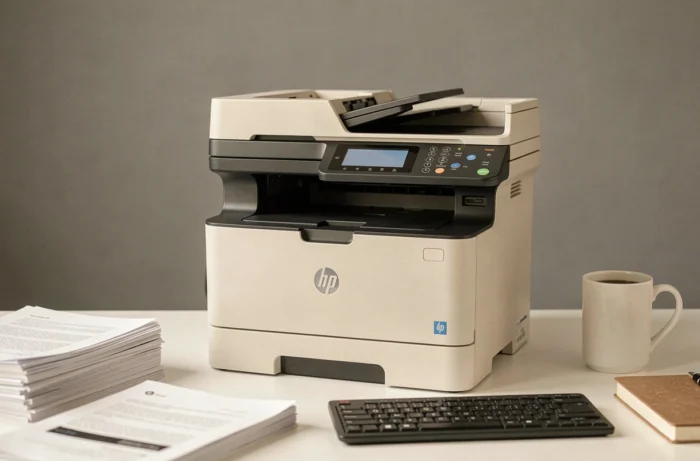
The HP LaserJet Pro M281fdw remains one of the most cited color laser multifunction printers in comparisons for small offices and freelancers. We thoroughly examined this model to assess its actual performance, technical limitations, and especially its relevance as a purchase at a time when HP is tightening its firmware policy on third-party consumables.
Firmware and compatible toners: the real friction point of the M281fdw
The topic that most consumer tests overlook is firmware management. HP regularly deploys updates that can block remanufactured or compatible toner cartridges. On the M281fdw, this mechanism is active: after an update, the message “non-authentic cartridge” may appear and prevent printing.
For those relying on third-party toners to reduce the cost per copy, this is a factor to anticipate. Disabling automatic firmware updates from the touchscreen or the embedded web server (EWS) allows for continued compatibility with alternative consumables. This adjustment is made via the printer’s network administration panel.
In terms of availability, original HP 202A and 202X toners are still easily found. Compatible versions are also offered by several third-party manufacturers. Before purchasing, it is relevant to consult a test and review of the HP LaserJet Pro M281fdw that details the actual cost per page based on the type of toner used.
Color laser print quality and rendering on different papers
The color rendering is accurate and consistent, even on documents with solid colors or gradients. Black texts come out sharp, with well-defined edges that are perfectly suited for professional documents: quotes, letters, presentations.
On standard office paper, colors remain true without smudging. However, on thick paper or special media, the thermal bonding behavior may vary. One should not expect the output of a photo printer, but for regular color documents, the M281fdw fulfills its role.
The flatbed scanner provides adequate scanning for document archiving. The automatic document feeder (ADF) accepts multiple sheets in sequence, which speeds up copying and batch scanning. The scanning resolution is sufficient for text and graphics, but less so for high-definition photos.
Print speed and noise: what the technical sheets don’t say
The speed advertised by HP in pages per minute corresponds to a stabilized flow after the first page. In practice, the time to output the first page remains the most relevant criterion for office use where short documents are often printed.
On this point, the M281fdw performs adequately in black and white. In color, the first print takes a few seconds longer. For long series, the pace approaches the manufacturer’s values.
The noise level deserves mention. The printer is noticeably loud at the start of a print cycle, with a marked mechanical noise during the warm-up of the fuser. In a small shared office, this is noticeable. Once the cycle is underway, the volume drops to an acceptable level.
Network connectivity and touchscreen: daily ergonomics
Connectivity is one of the objective strengths of this model:
- Direct Wi-Fi and standard Wi-Fi for wireless integration into an existing network, without mandatory Ethernet cable
- Ethernet port for wired installations that require a stable and fast connection
- Direct USB access, useful for stations not connected to the network
- Compatibility with AirPrint, Google Cloud Print (when the service was active), and the HP Smart app for mobile printing
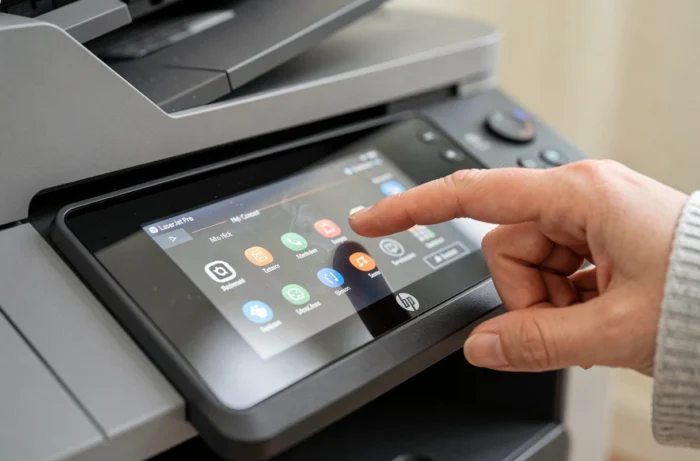
The color touchscreen makes navigating menus, configuring the network, and managing scanning settings easy. Its interface remains clear, even if the touch responsiveness does not match that of a smartphone.

Is the M281fdw still a relevant purchase today?
This model is no longer new. The question of longevity arises on several concrete axes:
- Original consumables are still distributed, ensuring a hassle-free supply in the short term
- Wear parts (transfer roller, fuser, drive rollers) remain available from specialized HP spare parts dealers
- Firmware security updates depend on HP’s support policy, which can change without notice for models nearing the end of their commercial cycle
The availability of compatible toners and parts determines the actual lifespan of this printer beyond its mechanical robustness. A model whose consumables disappear from the market quickly becomes unusable, regardless of its intrinsic reliability.
For a buyer who finds the M281fdw at an attractive price in the second-hand market or in clearance, it remains a solid and complete machine. When new, comparing with successor models in the HP Color LaserJet Pro range allows for checking if a gain in features or a better support policy justifies the price difference.
The HP LaserJet Pro M281fdw retains its fundamental qualities: reliable color laser printing, comprehensive connectivity, functional scanner with ADF. The focus now is on firmware management regarding third-party toners and the software support horizon that HP will maintain for this model.